
Are you a government employee in Pakistan who hasn’t received their salary slip this month? Visiting the accounts office repeatedly just to collect pay slips can be frustrating.The good news is that PIFRA makes this process simple and hassle-free. Through PIFRA, you can receive your monthly salary slip directly in your email inbox. In this article, you’ll find a complete guide on PIFRA salary slip registration, its advantages, required information, and solutions to common portal issues.
Download PIFRA Salary Slip Instantly, No Charges
Downloading your salary slip through the PIFRA registration has become very simple. There is no longer any need to visit a computer operator or accounts office for this purpose. Your pay slip is now available with just a single click. Simply click the download button, enter the required details, and submit the form to get your salary slip instantly.
PIFRA Contact Information
| PIFRA Contact Number | Helpline | Address |
| 051 111 725 725 (Extensions: 323-324) | 051-9206633 / 051-9206635 | PIFRA, Second Floor, C-Block, Finance Division, Secretariat, Islamabad |
Register for PIFRA Pay Slip Online at www.pifra.gov.pk
If you have completed the required information for registration as given below, follow the steps below.
Visit the Official Web Page:
- Open the browser on your mobile, laptop or tablet.
- And visit the official registration site https://m.pifra.gov.pk/.
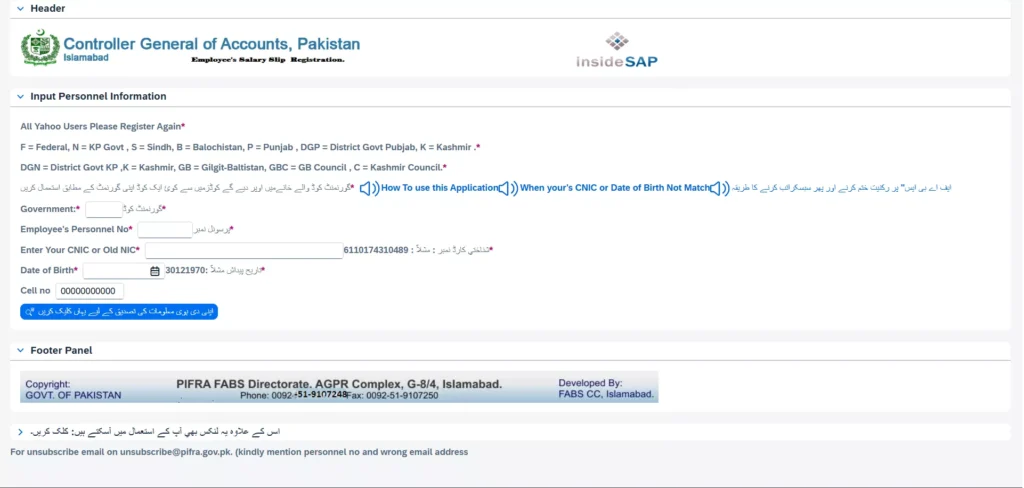
Fill Out the Pifra Registration Form:
As you open the site, a registration form will appear on your screen. Fill the form with the following parameters.
- ➤ Government Code
- ➤ Employee ID
- ➤ CNIC
- ➤ Date of Birth
- ➤ Phone No.
- ➤ After entering all information, click on the button (اپنی دی گئی ہوئی معلومات کی تصدیق کر لیں)
If you have not yet registered your email address on the PIFRA portal, please follow the simple steps provided in our guide, “How to Register an Email in PIFRA.” After completing the email registration, you can easily download your salary slip using your CNIC by following the steps given below.
Before submitting the details, carefully review them for accuracy. If your information is verified successfully, you will receive a message stating, “Your provided information is correct.”Email Activation & Authentication
- After receiving the confirmation message, click on the button “ایمیل رجسٹریشن کے لیے یہاں کلک کریں” to proceed.
- Next, you will need to verify your email address. A confirmation email will be sent to your inbox—open it and confirm your email.
- Once the email verification is completed, click on the button “اس بٹن پر کلک کریں” to finalize the process.
Approval and Verification:
After successfully completing all the above steps, congratulations, you are now ready to receive your monthly salary slips and other financial details via PIFRA. Moreover, if you are a senior officer or a DDO, you will be provided with login credentials. Using these credentials, you can access and manage your PIFRA account easily.
PIFRA Web Portal for Government Employees
The PIFRA web portal is specifically designed for government employees. If you work in any government department such as a teacher, pensioner, or employee of any other department, you must register on this portal.
After successful registration, you will receive a username and password to log in. With these credentials, you can download your salary or pay slip, pension slip, and also track your loans and advances online.
Benefits of Pifra Registration
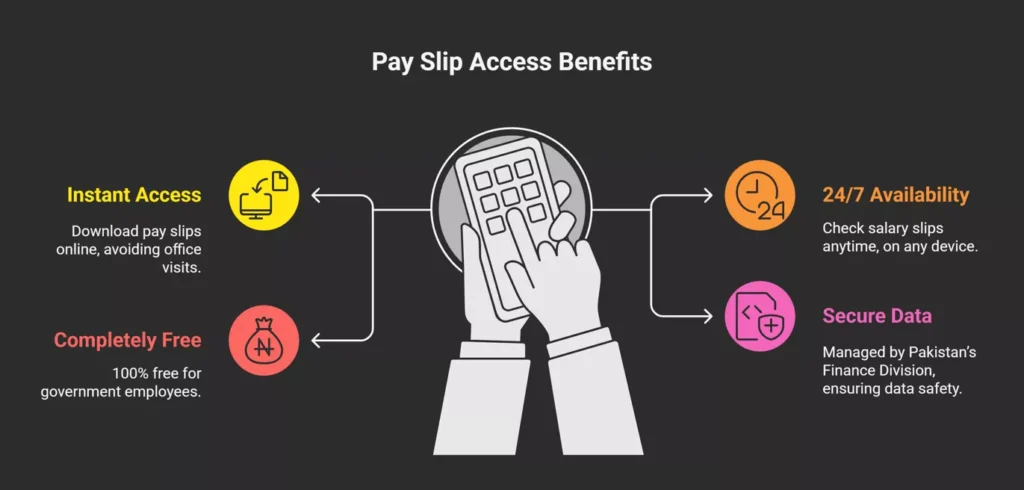
Instant Access to Monthly Pay Slips
The primary purpose of the PIFRA portal is to allow government employees to access their pay slips instantly whenever needed. There is no need to visit offices or wait for manual delivery of salary slips.
24/7 Availability and Convenience
You can view your salary slips at any time from any device—mobile, desktop, or tablet. There are no specific dates or time restrictions, making it extremely convenient for government employees.
Completely Free of Cost
All PIFRA services are fully free for government employees. There are no charges for registration, accessing pay slips, or receiving updates.
Real-Time Budget and Expenditure Tracking
- DDO Budget Execution Reports
- Expenditure Tracking
- For DDOs (Drawing and Disbursing Officers), PIFRA provides access to additional tools such as:
- This digital system is also beneficial for vendors and contractors working with the government. They can track payments using their vendor number. For more details, refer to our guide on PIFRA Vendor Information.
Secure Financial Data
The entire process is managed by the Finance Division of Pakistan, ensuring that all financial data is secure and handled by authorized personnel only.
PIFRA Online Registration Requirements for Govt Employees
Before starting your PIFRA registration, ensure that you have all the information required by the portal. You can complete the registration using the PIFRA app on your mobile or laptop, or through a web browser such as Chrome. The following information will be needed.
- 🟢 A phone number (registered in your own name)
- 🟢 Government code (separate for each province; details provided below)
- 🟢 CNIC No.
- 🟢 Valid Email address
- 🟢 Date of birth
- 🟢 Employee ID or personal number (can be obtained from your office or previous salary slips)
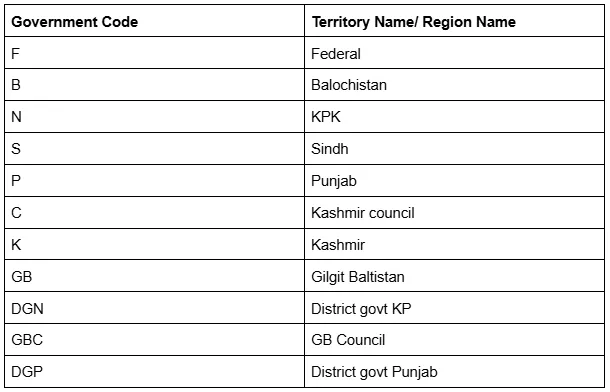
PIFRA Registration Form Government Codes List
For easier access and efficient management, PIFRA assigns specific codes to employees based on their region. Employees from different areas of Pakistan, such as Punjab, Sindh, Balochistan, Khyber Pakhtunkhwa, and Islamabad—should use their respective regional code during registration.
If you are unsure about your PIFRA DDO or position code, you can refer to our comprehensive guide on the PIFRA DDO and Position Code List for Government Employees.
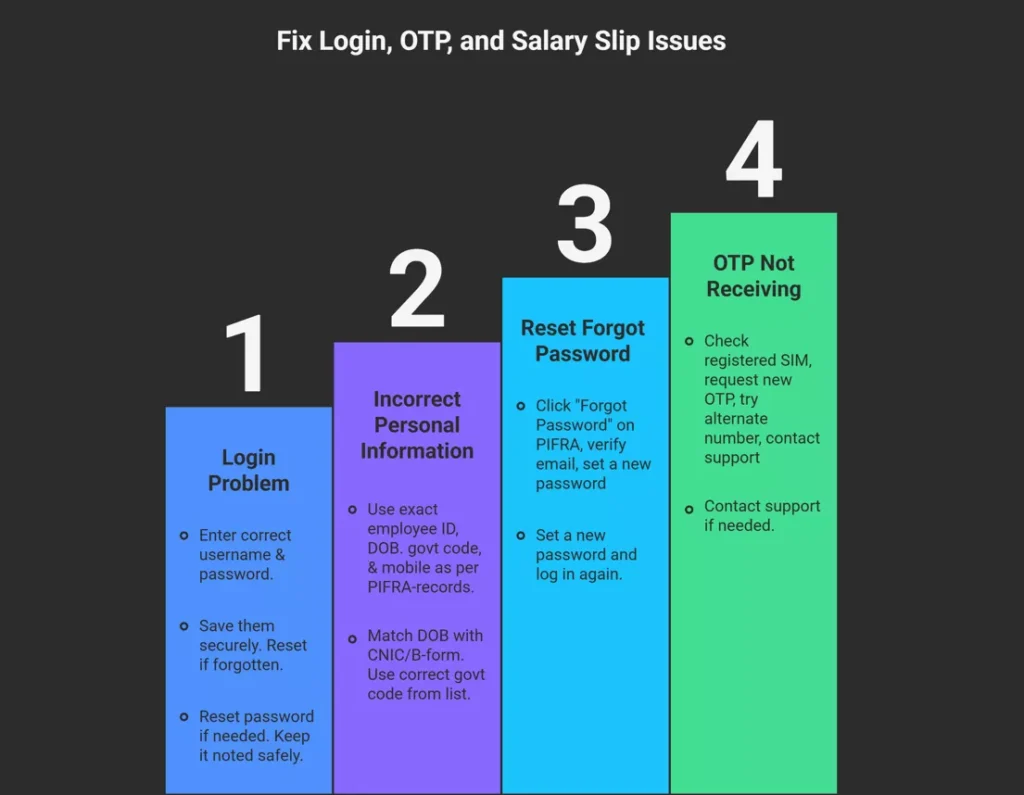
PIFRA Registration Issues and How to Solve Them
Although the PIFRA registration process is quite simple and can usually be completed smoothly, some common issues may still arise. To help you, I am listing these potential problems along with their solutions, step by step.
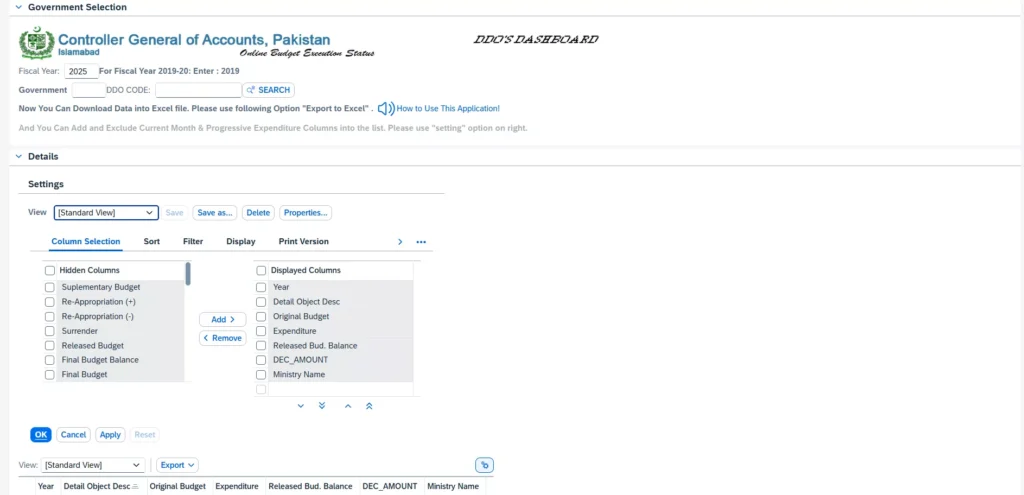
DDO Ber Monthly Expenditure Report 2025
DDO BER stands for “Drawing and Disbursing Officer Budget Execution Report.” It provides a detailed record of finances and expenditure for a specific government department each month. Through this system, government employees can easily access their department’s DDO budget reports with just one click. All the latest information regarding budgets, loans, advances, and expenditures is available here. Simply click the button to view the reports.
PIFRA: Check Pension, Salary Slip & Budget Online
PIFRA stands for “Project to Improve Financial Reporting and Auditing.” It was launched by the Government of Pakistan to implement financial reforms with the primary goal of enhancing credibility, reliability, and transparency in the country’s finance departments.
With support from the World Bank, PIFRA was introduced in Pakistan in 1996. Thanks to this system, every government employee can easily access their salary or pension details online. Higher-level officers can also monitor departmental budgets, advances, and bills using the available tools.
PIFRA Pension Calculation:
If you are a retired government employee and want to know your pension amount, PIFRA makes it simple. There is no need to visit offices for this purpose. You can calculate your pension conveniently using the provided formula.
Pension Amount = Number of years of service * Average monthly salary * Pension percentage / 100In addition to tracking your DDO BER monthly expenditures, you can also monitor your PIFRA bill status online. This allows you to check whether your department’s bills have been approved, rejected, or are under process. The remarks on your bill status help you identify any issues with the submitted bills early, ensuring timely corrections and follow-ups.
FABS Directorate CGA Pakistan
FABS stands for “Federal Accounting and Budgeting System.” It is a modern IT system developed under PIFRA and managed by the Controller General of Accounts (CGA).
FABS serves as the core controlling system for the government’s financial operations. When a government employee registers for salary slips through PIFRA, FABS is the system that processes and retrieves this information. It authenticates data from the DDO records, validates it, and sends pay slips through CGA-verified SAP-based servers.
What Does SAP Mean in FABS CGA?
SAP stands for “Systems, Applications, and Products.” It is a Germany-based software company that provides ERP (Enterprise Resource Planning) systems, widely used by governments for efficient financial management.
CGA Pakistan selected the SAP system for its reliability and effective management capabilities. When you register on PIFRA, SAP verifies your employee record through FABS. Your salary slip is then generated and delivered via SAP-based ESS servers.
In short, PIFRA, FABS, and SAP work together seamlessly to provide government employees with a modern, secure, and efficient financial management system.
Final Words
I hope you can complete the PIFRA registration on the web portal easily by following the steps mentioned above. You can also use the PIFRA mobile app for registration. If you encounter any issues during the process, you can refer to our guide on common problems and solutions.
In short, PIFRA has centralized financial management across various government departments. Government employees can now access their pay slips, advances, and loans anytime through the PIFRA web portal or mobile app, making financial management easier and more efficient.